Help centerEditing
Change colours, fonts and dark mode
Restyle every screen at once from the Style panel. Changes are free and show straight away.
Updated 5 November 2026
Your app's look is set by its colours, fonts and a few other values. Change them in the Style tab on the left of the design screen, and every screen updates at once.
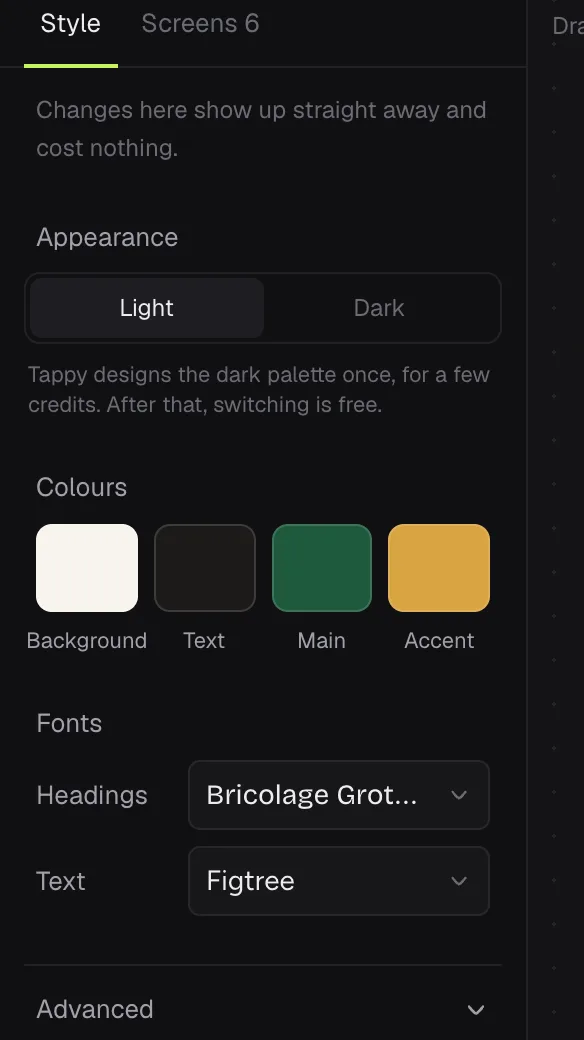
- Appearance: switch between Light and Dark. The first time, Tappy designs the other palette for a few credits. After that, switching is free.
- Colours: Background, Text, Main and Accent. Click one to pick a new colour. The picker warns you if text becomes hard to read and can fix it.
- Fonts: Headings and Text. Search for a font, or press Upload your font (.woff2, .woff, .ttf or .otf).
- Advanced: every colour, text sizes, spacing, corner rounding and the icon set.
Something not covered here? Use the feedback button in your dashboard, or email hello@usetappy.app.